goplakshram
அப்பா(கோபால்)+அம்மா(லக்ஷ்மி)+நான்(ராம்)
Thursday, November 18, 2010
very powerful Youtube Video Accelerator - fastest youtube video Downloder
click here http://www.mediafire.com/?jsd06nxy30xy78o
Bywifi Video Downloader (Bywifi Video Accelerator) is a free program for downloading, transcoding and accelerating video streaming. It supports downloading, transcoding and P2P accelerating videos from all video websites, such as Youtube, Dailymotion, Metacafe, MySpace, Yahoo, Justin.tv, etc. Lots of advanced network technologies like P2SP (peer-to-server-and-peer), multiple tasks, web sensitive, intelligence caching are used in the software. The bitrate of video streaming is 3-5 times faster with Bywifi than without it. Moreover, it can transcode videos into mobile formats for mobile phones and PDA.
change boring windows default icon to u r wish


click here http://www.mediafire.com/?a7pacc7vq7ldji3
| IconInvader is specifically designed for the following purpose: | |
| 1. replace the standard icon of a folder to any other icon. | |
| 2. replace various Windows Shell icons. | |
| 3. search and extract icons from various files(*.ico, *.exe, *.dll, *.ocx, *.scr, *.drv, ...). | |
| 4. export icons to an icon file or to a folder. | |
| Pic.1~Pic.3 is the main window of IconInvader. The following is a general introduction: | |
| 1. | Choose changing option. |
| 2. | Choose folder to change. |
| 3. | Folder's description field. |
| 4. | Change/Reset folder's icon buttons field. |
| 5. | Choose where the destination icon from. |
| 6. | Choose searching path. |
| 7. | Choose display page. |
| 8. | Found icons list. |
| 9. | Search/Export/Icon Library function fields. |
| 10. | Options/Clean Cache/Help/Register/About/Exit buttons field. |
| 11. | Status bar information. |
| 12. | Choose interface language. |
| 13. | Hide left pane. |
| 14. | Windows Shell icons list. |
| 15. | Change/Reset/Reset All Shell icons buttons field. |
| 16. | Choose a file including icons. |
| 17. | Export/Icon Library functions fields. |
| 18. | Show left pane. |
How to Watermark Your Photos -
click here http://www.mediafire.com/?qba7mucacyb95v7
you want to watermark your photos, you can use either text or another picture as the source of the watermark. If you want to add the watermark to the background, you can set the logo or the text to be more or less transparent, and place it wherever you want the watermark to be on the image.
- Multilanguage support, English, German, Italian, Japanese, Hungarian, Spanish, French, Dutch, Portuguese (Brazilian & Portugal), Chinese (Simplified & Traditional), Indonesian, Russian and Danish is supported.
- Add text watermark that is either normal, embossed, chiseled or watermarked with a border.
- Automatically rotate the watermarked picture based on the orientation EXIF tag - this is written to the image by many modern cameras.
- Add the text used to watermark the image to the EXIF information in the resulting file.
- Keep or drop EXIF information in jpeg files (Camera model/lense model/etc. etc.)
- Output the watermarked photo to JPEG, TIFF, PNG, BMP, GIF file format.
- Specify the quality of the watermarking output when saving as jpeg images
- Angle the text you use for your photo watermarking
- Insert background watermark in digital images, pictures, photos
- Resize images while watermarking the image/photo
- Watermark your photos using either another image, photo or picture
- Watermark your photos using your own text in the color and style you want to.
- Maintain directory structure in destination directory or combine all batch watermarked images into one directory
- Skip or overwrite existing watermarked images/photos in destination directory
- Command line option to automatically load a profile and batch watermark all photos.
- Automatically check for new version of the TSR Watermark Image Software
You can even use this program instead of photoshop to watermark your images, this is a quicker and more easy way of getting a watermark on all your images. Also use the watermarked image in Word, Excel or images used in pdf files can be made with this.
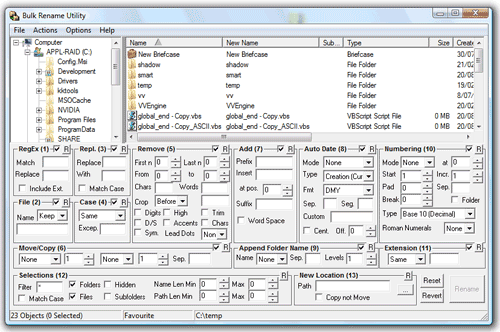
Rename multiple files quickly - Bulk Rename Utility(Batch Rename)

click here http://www.mediafire.com/?d8jh8avinbvv688
Bulk Rename Utility is a free file renaming software for Windows. Bulk Rename Utilityallows you to easily rename files and entire folders based upon extremely flexible criteria.
Add date/time stamps, replace numbers, insert text, convert case, add auto-numbers, process folders and sub-folders....plus
Bulk Rename Utility is an easy to use file rename program Renaming multiple files has never been easier! It has a small memory footprint so it can be left running all the time without consuming all your memory. It started as a freeware Visual Basic tool, but as its popularity has grown it has been completely rewritten in C++ to be robust and lightweight - and very, very fast! It can easily handle folders/discs containing well over 100,000 entries... and it can batch rename1,000s of files in seconds.
Wednesday, November 17, 2010
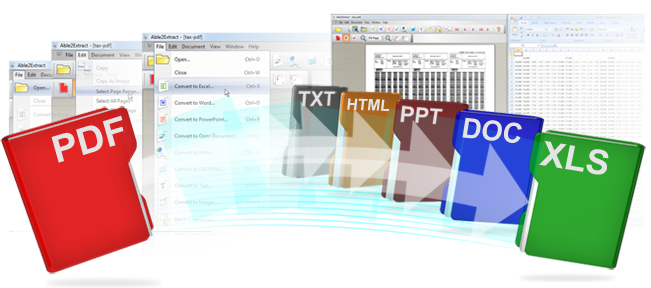
convert an image/pdf to excel, word etc.. - able 2 extract Full Version

download here http://www.mediafire.com/?2934tk6znkq64ln
Able2Extract has a very simple and straightforward user interface. This results in the use of A2E being a simple 4 step process that takes only seconds to execute:
| Step 1 | Step 2 | Step 3 | Step 4 |
| Open the document you want to convert. Document can be PDF, HTML, TXT. | Select the data in the document you wish to convert. | Choose your desired destination format PDF to Excel, PDF to Word, PDF to PowerPoint or PDF to Autocad or PDF to Open Office or PDF to Text | Presto! The selected data is instantaneously transferred into the destination format. |
Convert, Export, Extract, Transfer data from one format to another:
From PDF: PDF to Excel, PDF to Word, PDF to HTML, PDF to PowerPoint, PDF to Text, PDF to AutoCad, PDF to Images, PDF to Open Office
From HTML: HTML to Excel, HTML to Word, HTML to Text
From Text: Text to Excel, Text to Word, Text to HTML
From HTML: HTML to Excel, HTML to Word, HTML to Text
From Text: Text to Excel, Text to Word, Text to HTML
To Excel: PDF to Excel, HTML to Excel, Text to Excel
To Word: PDF to Word, HTML to Word, Text to Word
To PowerPoint: PDF to PowerPoint
To Text: PDF to Text, HTML to Text
To HTML: PDF to HTML
To Image Formats: PDF to JPG, PDF to GIF, PDF to BMP
To AutoCad: PDF to DWG, PDF to DXF
To Open Office: PDF to ODT (Writer), PDF to ODS (Calc), PDF to ODP (Impress)
Use Able2Extract to save hours and hours of your time! Stop wasting your time with data conversion - Able2Extract is here!To Word: PDF to Word, HTML to Word, Text to Word
To PowerPoint: PDF to PowerPoint
To Text: PDF to Text, HTML to Text
To HTML: PDF to HTML
To Image Formats: PDF to JPG, PDF to GIF, PDF to BMP
To AutoCad: PDF to DWG, PDF to DXF
To Open Office: PDF to ODT (Writer), PDF to ODS (Calc), PDF to ODP (Impress)
| Better Data, Better Results | |||||||
| Investintech Conversion | Product Able2Extract | ||||||
| source\ destination | Excel | Word | HTML | Text | PowerPoint | Autocad | Open Office |
| HTML | |||||||
| Text | |||||||
Copy your files faster and easier - Teracopy Pro
Click Here http://www.mediafire.com/?y8uiie7ag73ri7g
TeraCopy is a compact program designed to copy and move files at the maximum possible speed, providing the user with a lot of features:
- Copy files faster. TeraCopy uses dynamically adjusted buffers to reduce seek times. Asynchronous copy speeds up file transfer between two physical hard drives.
- Pause and resume file transfers. Pause copy process at any time to free up system resources and continue with a single click.
- Error recovery. In case of copy error, TeraCopy will try several times and in the worse case just skip the file, not terminating the entire transfer.
- Interactive file list. TeraCopy shows failed file transfers and lets you fix the problem and recopy only problem files.
- Shell integration. TeraCopy can completely replace Explorer copy and move functions, allowing you work with files as usual.
- Full Unicode support.
paint your Home or Building easily - CBN Selector
Click here download http://www.mediafire.com/?2bctfbxzb432x3k
How to use:
1)install
in this trail version u cant directly save the image
one alternative thing is there.
when u finish the work just press print screen & then open paint
paste then crop it
good luck
Advanced Color Visualization
CBN Selector™ uses a patent pending method to create the most accurate, and photo-realistic application of color on your digital images. Use CBN Selector™ to view color options for painting, textiles, autos, cosmetics - anything with color!
Color Grabber
Grab a color from any digital image, anywhere on your computer - and the CBN code ensures you can have that color created in your material of choice. Use the zoom level for precise selection of the millions of available colors.
Image Color Palette
CBN Selector™ unlocks the world of color. Now you can use your digital images as your new paint palette. CBN Selector™ "Color Grabber" helps you select your colors from your own digital photo's. Create the colors from that special vacation, easily match the colors of a painting or piece of furniture, even create the colors of nature and have them made in paint and other building materials!
Fandecks
Thousands of manufacturers standard colors available for colored building products
Color Harmonies
Designer color harmonies are now available for your viewing, application - and modification.
Increased User Flexibility
More flexibility than ever allows users to customize their workspace, drag & drop colors, preview colors before applying, organize views with dockable windows, and adjustable options to improve performance while working with large images
Easy Prep
Easy shift between "Prepare" mode and "Colorize" mode makes image preparation a breeze.
My Colors
Create and save your own color harmonies, drag & drop colors into "My Colors."
Coordinate Utility
Create your own color harmonies with the Color wheel that includes standard design conventions.
Color Chip
Resizable Color Chip displays the selected mass tone color, and includes texture application and display.
Complete List of Features
- Colorize images with real world colors
- Create your personal colors from your own digital images in a variety of materials
- Digital certification of colors ensures accurate presentation & communication of color values
- Thousands of standard Industry Fandeck colors
- Scores of professionally created color harmonies
- Thousands of additional user defined custom colors available
- Multi-product support (Paint, Stucco, Sealant, etc.)
- CBN Code ensures device, material and color space independent measure of color
- Drag & Drop color application
- Sizeable Color Chip for view of mass tone color
- Color Grabber allows selection, application and real world creation of colors in your digital photo
- EasyPrep Prepare to Colorize feature for easier image editing
- A variety of Image preparation tools
- SmartImage color extraction and application algorithms, for the purest color application while maintaining the most accurate representation of real world colors.
- Unlimited number of SmartImage areas can be created for each image
- Create, Save & Share virtually unlimited number of “My Colors” personal color harmonies
- “Coordinate” with Color Design Wheel, according to industry standard design conventions
- Color history with multi-view support
- Complete Help file and Tips dialogue
- Report Generation
- Dockable windows
- Export Image as *.bmp, *.jpg
- Import Image formats including *.bmp, *.tif, *.jpg, etc
- Seamless connection & downloading of thousands of digitally certified colors from ColorCharts.org
- Custom labeling of colors
- Zoom functionality for easier image preparation
- Image Color Palette with "Image Zoom" for precise custom colors!
Subscribe to:
Posts (Atom)