Thursday, November 18, 2010

very powerful Youtube Video Accelerator - fastest youtube video Downloder


click here http://www.mediafire.com/?jsd06nxy30xy78o


Bywifi Video Downloader (Bywifi Video Accelerator) is a free program for downloading, transcoding and accelerating video streaming. It supports downloading, transcoding and P2P accelerating videos from all video websites, such as Youtube, Dailymotion, Metacafe, MySpace, Yahoo, Justin.tv, etc. Lots of advanced network technologies like P2SP (peer-to-server-and-peer), multiple tasks, web sensitive, intelligence caching are used in the software. The bitrate of video streaming is 3-5 times faster with Bywifi than without it. Moreover, it can transcode videos into mobile formats for mobile phones and PDA.

change boring windows default icon to u r wish


click here http://www.mediafire.com/?a7pacc7vq7ldji3


IconInvader is specifically designed for the following purpose:
1. replace the standard icon of a folder to any other icon. 
2. replace various Windows Shell icons.
3. search and extract icons from various files(*.ico, *.exe, *.dll, *.ocx, *.scr, *.drv, ...).
4. export icons to an icon file or to a folder.
 
Pic.1~Pic.3 is the main window of IconInvader. The following is a general introduction: 
1.Choose changing option.
2.Choose folder to change.
3.Folder's description field.
4.Change/Reset folder's icon buttons field.
5.Choose where the destination icon from.
6.Choose searching path.
7.Choose display page.
8.Found icons list.
9.Search/Export/Icon Library function fields.
10.Options/Clean Cache/Help/Register/About/Exit buttons field.
11.Status bar information.
12.Choose interface language.
13.Hide left pane.
14.Windows Shell icons list.
15.Change/Reset/Reset All Shell icons buttons field.
16.Choose a file including icons.
17.Export/Icon Library functions fields.
18.Show left pane. 

How to Watermark Your Photos -


TSR Watermark Image Software screenshot of photo watermarking


you want to watermark your photos, you can use either text or another picture as the source of the watermark. If you want to add the watermark to the background, you can set the logo or the text to be more or less transparent, and place it wherever you want the watermark to be on the image.

  • Multilanguage support, English, German, Italian, Japanese, Hungarian, Spanish, French, Dutch, Portuguese (Brazilian & Portugal), Chinese (Simplified & Traditional), Indonesian, Russian and Danish is supported.
  • Add text watermark that is either normal, embossed, chiseled or watermarked with a border.
  • Automatically rotate the watermarked picture based on the orientation EXIF tag - this is written to the image by many modern cameras.
  • Add the text used to watermark the image to the EXIF information in the resulting file.
  • Keep or drop EXIF information in jpeg files (Camera model/lense model/etc. etc.)
  • Output the watermarked photo to JPEG, TIFF, PNG, BMP, GIF file format.
  • Specify the quality of the watermarking output when saving as jpeg images
  • Angle the text you use for your photo watermarking
  • Insert background watermark in digital images, pictures, photos
  • Resize images while watermarking the image/photo
  • Watermark your photos using either another image, photo or picture
  • Watermark your photos using your own text in the color and style you want to.
  • Maintain directory structure in destination directory or combine all batch watermarked images into one directory
  • Skip or overwrite existing watermarked images/photos in destination directory
  • Command line option to automatically load a profile and batch watermark all photos.
  • Automatically check for new version of the TSR Watermark Image Software
You can even use this program instead of photoshop to watermark your images, this is a quicker and more easy way of getting a watermark on all your images. Also use the watermarked image in Word, Excel or images used in pdf files can be made with this.

Rename multiple files quickly - Bulk Rename Utility(Batch Rename)


click here http://www.mediafire.com/?d8jh8avinbvv688
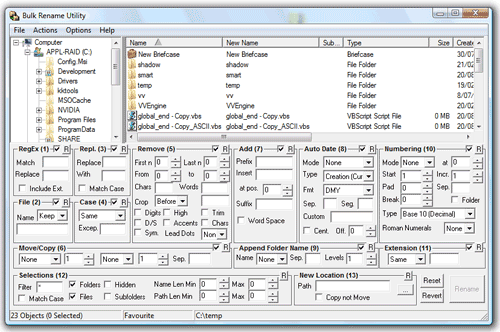
Bulk Rename Utility is a free file renaming software for Windows. Bulk Rename Utilityallows you to easily rename files and entire folders based upon extremely flexible criteria.
Add date/time stamps, replace numbers, insert text, convert case, add auto-numbers, process folders and sub-folders....plus 
- Rename multiple files quickly, according to many flexible criteria.
- Rename files in many ways: add, replace, insert text into file names. Convert case, add numbers. Remove or change file extensions.
- Check the detailed preview before renaming.
- Rename photos using EXIF meta data (i.e. "Date Picture Taken", "Resolution" and other information embedded in all JPG photo files) Rename your holiday pictures from a meaningless dsc1790.jpg to NewYork1.jpg in a flash.
- Rename MP3 files using ID3 tags (a.k.a. MP3 ID3 tag renaming).
- Change files' creation and modification time stamps.


Bulk Rename Utility is an easy to use file rename program  Renaming multiple files has never been easier! It has a small memory footprint so it can be left running all the time without consuming all your memory. It started as a freeware Visual Basic tool, but as its popularity has grown it has been completely rewritten in C++ to be robust and lightweight - and very, very fast! It can easily handle folders/discs containing well over 100,000 entries... and it can batch rename1,000s of files in seconds.

Wednesday, November 17, 2010

convert an image/pdf to excel, word etc.. - able 2 extract Full Version

Able2Extract - Pdf to XLS Converter and Much More
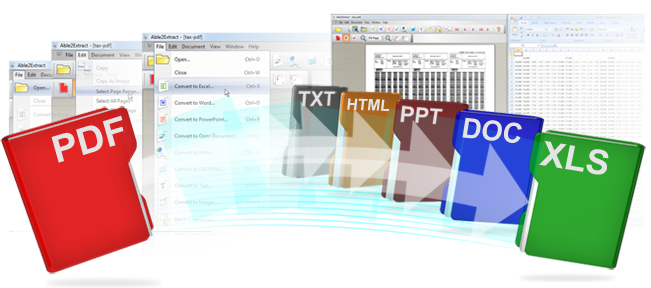
Able2Extract has a very simple and straightforward user interface. This results in the use of A2E being a simple 4 step process that takes only seconds to execute:
Step 1Step 2Step 3Step 4
Open the document you want to convert. Document can be PDF, HTML, TXT.Select the data in the document you wish to convert.Choose your desired destination format PDF to Excel, PDF to Word, PDF to PowerPoint or PDF to Autocad or PDF to Open Office or PDF to TextPresto! The selected data is instantaneously transferred into the destination format.

Convert, Export, Extract, Transfer data from one format to another:
From PDF: PDF to Excel, PDF to Word, PDF to HTML, PDF to PowerPoint, PDF to Text, PDF to AutoCad, PDF to Images, PDF to Open Office
From HTML: HTML to Excel, HTML to Word, HTML to Text
From Text: Text to Excel, Text to Word, Text to HTML
To Excel: PDF to Excel, HTML to Excel, Text to Excel
To Word: PDF to Word, HTML to Word, Text to Word
To PowerPoint: PDF to PowerPoint
To Text: PDF to Text, HTML to Text
To HTML: PDF to HTML
To Image Formats: PDF to JPG, PDF to GIF, PDF to BMP
To AutoCad: PDF to DWG, PDF to DXF
To Open Office: PDF to ODT (Writer), PDF to ODS (Calc), PDF to ODP (Impress)
Use Able2Extract to save hours and hours of your time! Stop wasting your time with data conversion - Able2Extract is here!
Better Data, Better Results
Investintech ConversionProduct Able2Extract
source\ destination
Excel
Word
HTML
Text
PowerPoint
Autocad
Open Office
PDF
HTML
Text

Copy your files faster and easier - Teracopy Pro

Compact Size

TeraCopy is a compact program designed to copy and move files at the maximum possible speed, providing the user with a lot of features:
  • Copy files faster. TeraCopy uses dynamically adjusted buffers to reduce seek times. Asynchronous copy speeds up file transfer between two physical hard drives.
  • Pause and resume file transfers. Pause copy process at any time to free up system resources and continue with a single click.
  • Error recovery. In case of copy error, TeraCopy will try several times and in the worse case just skip the file, not terminating the entire transfer.
  • Interactive file list. TeraCopy shows failed file transfers and lets you fix the problem and recopy only problem files.
  • Shell integration. TeraCopy can completely replace Explorer copy and move functions, allowing you work with files as usual.
  • Full Unicode support.

paint your Home or Building easily - CBN Selector


Click here download http://www.mediafire.com/?2bctfbxzb432x3k
How to use:
1)install
in this trail version u cant directly save the image
one alternative thing is there.
when u finish the work just press print screen & then open paint 
paste then crop it
good luck


Advanced Color Visualization
CBN Selector™ uses a patent pending method to create the most accurate, and photo-realistic application of color on your digital images. Use CBN Selector™ to view color options for painting, textiles, autos, cosmetics - anything with color! 
Color Grabber
Grab a color from any digital image, anywhere on your computer - and the CBN code ensures you can have that color created in your material of choice. Use the zoom level for precise selection of the millions of available colors. 
Image Color Palette
CBN Selector™ unlocks the world of color. Now you can use your digital images as your new paint palette. CBN Selector™ "Color Grabber" helps you select your colors from your own digital photo's. Create the colors from that special vacation, easily match the colors of a painting or piece of furniture, even create the colors of nature and have them made in paint and other building materials! 
Fandecks
Thousands of manufacturers standard colors available for colored building products 
Color Harmonies
Designer color harmonies are now available for your viewing, application - and modification. 
Increased User Flexibility
More flexibility than ever allows users to customize their workspace, drag & drop colors, preview colors before applying, organize views with dockable windows, and adjustable options to improve performance while working with large images 
Easy Prep
Easy shift between "Prepare" mode and "Colorize" mode makes image preparation a breeze. 
My Colors
Create and save your own color harmonies, drag & drop colors into "My Colors." 
Coordinate Utility
Create your own color harmonies with the Color wheel that includes standard design conventions.
Color Chip
Resizable Color Chip displays the selected mass tone color, and includes texture application and display.
Complete List of Features
  • Colorize images with real world colors
  • Create your personal colors from your own digital images in a variety of materials
  • Digital certification of colors ensures accurate presentation & communication of color values
  • Thousands of standard Industry Fandeck colors
  • Scores of professionally created color harmonies
  • Thousands of additional user defined custom colors available
  • Multi-product support (Paint, Stucco, Sealant, etc.)
  • CBN Code ensures device, material and color space independent measure of color
  • Drag & Drop color application
  • Sizeable Color Chip for view of mass tone color
  • Color Grabber allows selection, application and real world creation of colors in your digital photo
  • EasyPrep Prepare to Colorize feature for easier image editing
  • A variety of Image preparation tools
  • SmartImage color extraction and application algorithms, for the purest color application while maintaining the most accurate representation of real world colors.
  • Unlimited number of SmartImage areas can be created for each image
  • Create, Save & Share virtually unlimited number of “My Colors” personal color harmonies
  • “Coordinate” with Color Design Wheel, according to industry standard design conventions
  • Color history with multi-view support
  • Complete Help file and Tips dialogue
  • Report Generation
  • Dockable windows
  • Export Image as *.bmp, *.jpg
  • Import Image formats including *.bmp, *.tif, *.jpg, etc
  • Seamless connection & downloading of thousands of digitally certified colors from ColorCharts.org
  • Custom labeling of colors
  • Zoom functionality for easier image preparation
  • Image Color Palette with "Image Zoom" for precise custom colors!

Bumptop Pro(with Serial)- 3D windows Desktop program


are you like your desktop like above image?
then download the pro version http://www.mediafire.com/?2bctfbxzb432x3k

BumpTop replaces your desktop with a visual environment unlike any you've used. It's a bit like a futuristic gestur
-based 
interface, but it's tied to your mouse. Were it capable of simultaneous Web browsing, its utility would be much more apparent.

BumpTop makes the items on your computer's desktop more like their real-world counterparts. Icons and folders are assigned a virtual weight based on the amount of memory they take up and their importance to you. You can move them by click-and-drag, or fling them across the BumpTop space. The program determines their importance based on how often you use them, but you can also alter that by hand. In a way, BumpTop takes the "Cover Flow" concept to the next level. Stack items to keep them organized, flip through them as you would a photo album, sprawl them across the desktop arbitrarily, or order them in staid grids. Circular wheel pie menus make options a mouse flick away, and the 3D "walls" make for fast posting to Facebook, e-mailing, and Twittering.
To alter a group of items, you lasso them--but you probably haven't used a lasso like this before. Unlike the square-edged standard Windows lasso, this one lets you select objects by drawing circles around them. Icons can be more scattered without it slowing your work flow because factors like angle, size changing, proximity, and icon flipping all impact on how you interact with your desktop. There's a built-in photo viewer, and although it doesn't allow for user interactions yet, the Safari and Chrome browsing engine WebKit is baked in, too.
If WebKit moves toward integrating browsing with your desktop in a customizable manner, and more gesture-based hardware support becomes commonplace, it could push how we use our computers into a whole new
dimension.

Changer Xp Full Version(with serial Key) - change your windows XP Boot Screen

if u are using XP then r u boring with while the computer starts the booting logo Microsoft Windows Xp loading etc.

u change it as u like (your image,children,nature what u want). its a user friendly.


Personalize your wallpaper, screensaver, boot screen & more Changer XP is an integrated tool to personalize the IE Skin, the desktop wallpaper, the Screen Saver as well as the boot screen of Windows 9x/Me/2000/XP all in one.

Here are some key features of "Changer XP":
-You can program desktop wallpaper, IE skin, screen saver and boot screen to change automatically after a specified time period (e.g. every 30 minutes). You can even change them in seconds, minutes, hours, and days!
-Support thumbnail view.
-Support image re-sampling with interpolation and averaging to produce a best quality image for boot screen and desktop wallpaper.
-Support color reduction with image dithering to keep the quality of the source image for boot screen, desktop wallpaper and IE skin.
-Support hotkeys to access features of Changer XP quickly.
-Use system tray to ease your control of Changer XP anytime.
-Setting and preview screen saver by context menu.
-JPG, BMP, TGA, GIF, PNG, TIF, WMF , EMF , TGA files are supported
-Fully support active desktop.
-Complete multi-language support, with run-time language switching
-Auto check new version online at startup.

Tuesday, November 16, 2010

Windows 7 Final (Extremely Compressed) JUST 14MB Only


Windows 7 Final retail version (Extremely Compressed) 9MB Only
download here http://www.mediafire.com/?l0ai6079tlt64h6


Windows 7 includes a number of new features, such as advances in touch and handwriting recognition, support for virtual hard disks, improved performance on multi-core processors,[36][37][38][39] improved boot performance, DirectAccess, and kernel improvements. Windows 7 adds support for systems using multiple heterogeneous graphics cards from different vendors (Heterogeneous Multi-adapter), a new version of Windows Media Center,[40] a Gadget for Windows Media Center, improved media features, the XPS Essentials Pack and Windows PowerShell being included, and a redesigned Calculator with multiline capabilities including Programmer and Statistics modes along with unit conversion. Many new items have been added to the Control Panel, including ClearType Text Tuner, Display Color Calibration Wizard, Gadgets, Recovery, Troubleshooting, Workspaces Center, Location and Other Sensors, Credential Manager, Biometric Devices, System Icons, and Display. Windows Security Center has been renamed to Windows Action Center (Windows Health Center and Windows Solution Center in earlier builds), which encompasses both security and maintenance of the computer. The default setting for User Account Control in Windows 7 has been criticized for allowing untrusted software to be launched with elevated privileges by exploiting a trusted application. Microsoft's Windows kernel engineer Mark Russinovich acknowledged the problem, but noted that there are other vulnerabilities that do not rely on the new setting. Windows 7 also supports Mac-like RAW image viewing through the addition of WIC-enabled image decoders, which enables raw image thumbnails, previewing and metadata display in Windows Explorer, plus full-size viewing and slideshows in Windows Photo Viewer and Window Media Center.

The taskbar has seen the biggest visual changes, where the Quick Launch toolbar has been replaced with pinning applications to the taskbar. Buttons for pinned applications are integrated with the task buttons. These buttons also enable the Jump Lists feature to allow easy access to common tasks.[45] The revamped taskbar also allows the reordering of taskbar buttons. To the far right of the system clock is a small rectangular button that serves as the Show desktop icon. This button is part of the new feature in Windows 7 called Aero Peek. Hovering over this button makes all visible windows transparent for a quick look at the desktop.[46] In touch-enabled displays such as touch screens, tablet PCs, etc., this button is slightly wider to accommodate being pressed with a finger.[47] Clicking this button minimizes all windows, and clicking it a second time restores them. Additionally, there is a feature named Aero Snap, that automatically maximizes a window when it is dragged to either the top or left/right edges of the screen.[48] This also allows users to snap documents or files on either side of the screen to compare them. When a user moves windows that are maximized, the system restores their previous state automatically. This functionality is also accomplished with keyboard shortcuts. Unlike in Windows Vista, window borders and the taskbar do not turn opaque when a window is maximized with Windows Aero applied. Instead, they remain translucent.
The Windows 7 taskbar.

For developers, Windows 7 includes a new networking API with support for building SOAP-based web services in native code (as opposed to .NET-based WCF web services), new features to shorten application install times, reduced UAC prompts, simplified development of installation packages, and improved globalization support through a new Extended Linguistic Services API. At WinHEC 2008 Microsoft announced that color depths of 30-bit and 48-bit would be supported in Windows 7 along with the wide color gamut scRGB (which for HDMI 1.3 can be converted and output as xvYCC). The video modes supported in Windows 7 are 16-bit sRGB, 24-bit sRGB, 30-bit sRGB, 30-bit with extended color gamut sRGB, and 48-bit scRGB. Microsoft has also implemented better support for solid-state drives,[54] including the new TRIM command, and Windows 7 is able to identify a solid-state drive uniquely. Microsoft is planning to support USB 3.0 in a subsequent patch, support not being included in the initial release due to delays in the finalization of the standard.

Internet Spades, Internet Backgammon and Internet Checkers, which were removed from Windows Vista, were restored in Windows 7. Windows 7 includes Internet Explorer 8 and Windows Media Player 12.

Users are also able to disable many more Windows components than was possible in Windows Vista. New additions to this list of components include Internet Explorer, Windows Media Player, Windows Media Center, Windows Search, and the Windows Gadget Platform. Windows 7 includes 13 additional sound schemes, titled Afternoon, Calligraphy, Characters, Cityscape, Delta, Festival, Garden, Heritage, Landscape, Quirky, Raga, Savanna, and Sonata. A new version of Microsoft Virtual PC, newly renamed as Windows Virtual PC was made available for Windows 7 Professional, Enterprise, and Ultimate editions. It allows multiple Windows environments, including Windows XP Mode, to run on the same machine, requiring the use of Intel VT-x or AMD-V. Windows XP Mode runs Windows XP in a virtual machine and redirects displayed applications running in Windows XP to the Windows 7 desktop.Furthermore Windows 7 supports the mounting of a virtual hard disk (VHD) as a normal data storage, and the bootloader delivered with Windows 7 can boot the Windows system from a VHD. The Remote Desktop Protocol (RDP) of Windows 7 is also enhanced to support real-time multimedia application including video playback and 3D games, thus allowing use of DirectX 10 in remote desktop environments. The three application limit, previously present in the Windows Vista Starter Edition, has been removed from Windows 7.

Removed features
A number of capabilities and certain programs that were a part of Windows Vista are no longer present or have been changed, resulting in the removal of certain functionality. These include the classic Start Menu user interface, Windows Ultimate Extras and InkBall. Four applications bundled with Windows Vista — Windows Photo Gallery,Windows Movie Maker, Windows Calendar[63] and Windows Mail — are not included with Windows 7, but are instead available for free in a separate package called Windows Live Essentials which can be found on the Microsoft website.

It's only in 9 Mb after extracting it should be 3.49Gb.
It's Working 100%

Minimum hardware requirements for Windows 7
Processor : 1 GHz
Memory (RAM) : 1 GB
HDD free space : 16 GB of available disk space
Optical drive : DVD drive (only to install from DVD/CD Media)

JAP/JONDO - anonymous and secure & HIDE your Ip while web surfing

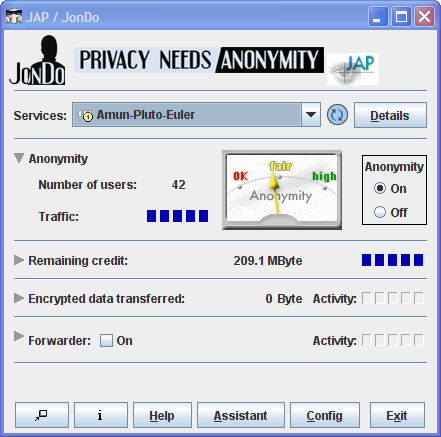
Screenshot

click here to download http://www.mediafire.com/?7ctpszs3pw7k8m5


Protection of Privacy on the Internet


JAP (called JonDo in the scope
 of the commercial JonDonym anonymous proxy servers - AN.ON remains free of charge) makes it possible to surf the internet anonymously and unobservably.
Without Anonymization, every computer in the internet communicates using a traceableAddress. That means:
  • the website visited,
  • the internet service provider (ISP),
  • and any eavesdropper on the internet connection
can determine which websites the user of a specific computer visits. Even the information which the user calls up can be intercepted and seen if encryption is not used. JAP uses a single static address which is shared by many JAP users. That way neither the visited website, nor an eavesdropper can determine which user visited which website.

Outages and maintenance times

We cannot guarantee our services (mixes, infoservice, website, download, etc.) and would like to apologize for any inconvenience caused due to system down time.
  • Because JAP is a research project, it is continuously being further developed. Nevertheless, we attempt to offer a stable, downloadable version at all times, and to keep the service available.
  • At the moment, the web servers and infoservices are run by universities and other public infrastructures and are free of charge for the user (even though a lot of extra data traffic is produced). Unfortunately, power supplies or data networks sometimes fail or are switched off for maintenance. We will try to keep you informed in the 'News' column on this website about planned maintenance but in case of an unforeseen failure in the university network, we are powerless.
  • Mixes and Mix Cascades, respectively, are operated by external organisations, which are independent from the project itself. We may inform the operators about outages, but we are unable to correct Mix failures ourselves, and typically cannot find the cause, either.
  • Architecture of the Anonymization Service

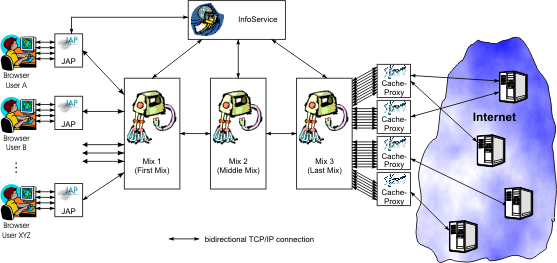
    The structure of the JAP anonymization service is shown schematically in the following diagram. It consists of the following components:
    • JAP Client program installed on the user's computer.
    • Mixes Anonymizing intermediaries which mix the data streams of various users together.
    • InfoService A separate service which provides meta-information about the available mixes (that is, mix cascades), number of users currently using the mix cascades, and the current load on the mix provider.

    How It Works

    When you start the JAP client program, JAP first connects to the InfoService to check if the program version is still current. If the version of the program is no longer compatible with the software of the mix, the user is automatically offered a program update, since otherwise the JAP service could no longer be used.
    In the next step, JAP registers with the first mix station of the chosen mix cascade. A permanent network connection between JAP and the first mix station remains until logoff.
    On installation of JAP, the user already configured the web browser so that each packet of data sent goes through JAP instead of directly to the internet. JAP encrypts the data and sends it to the first mix station. The first mix station then mixes the data with that of other users and sends it to the second mix station which passes it on to the third mix station which decrypts and sends the data through a cache proxy to the internet.
    Each mix carries out cryptographic operations on the message so that the JAP-encrypted data is only readable when it's gone through the proper mixes in the proper order. That way it's insured, that an eavesdropper either only receives unreadable (encrypted) data or can no longer determine the sender. In order for it to work correctly, only one mix in the cascade need be trusted not to inform the eavesdropper as to the method of message mixing. Here is a description of the exact method of encryption.

Ditto - a small program to clipboard facility


When installed and running, Ditto lets you copy something to the Clipboard and store it in its own database to make that clip retrievable at a later time. Ditto is, in effect, an extension to the standard facilities of Windows' own clipboard because in Ditto each new capture doesn't over-write the previous one as it does in Windows' Clipboard. This little program allows you to save any type of information that can be put into the clipboard, including text, images, html, and custom formats.
Ditto presents a very basic user interface. When you first install it, it runs with no clips on the board so of course it looks rather bare. But as you copy clips (select and use Ctrl/C as usual) the board fills up steadily until you reach the maximum number of clips you have set in the Options menu, the default being 500 items.
When you want to paste an item you just locate the cursor in your application, find the phrase you want in the clips list, and double click it. Or simply double clicking pastes the last item you copied to Ditto.

Multi-purpose

You can paste clips into any application that can accept copy/paste entries, and to help you identify clips, there are thumbnail images of non-text clips displayed in the Ditto Clipboard. Of course text captures show as text, and it has to be admitted that selection of these is less error-prone than that of non-text items. Nevertheless, the thumbnails are generally adequate for identification purposes provided you don't have a lot of them, all with similar outlines such as spreadsheet clips.
You can also drag-and-drop items from the Ditto board. That's a neat way of not only selecting the correct item, but it lets you drop in the clip precisely where you want it in the receiving document. You have the clipboard and the receiving document open alongside each other to facilitate this move. Normally, when you click away from the Ditto window, it disappears and so you have to open it again when you want to use it, but there's an option to arrange for 'Always on Top' location. If the Ditto Clipboard itself becomes intrusive, you can minimise it to a narrow vertical band that can be located at the edge of the screen by simply clicking on the double right arrow symbol at the lower right of the board.
Entering a keyword into the search box at the bottom of the Ditto Clipboard you can quickly locate specific items from the board. Ditto filters the board contents so show only such items, making it easier to identify the one you want.

Groups

Additionally, you can arrange for clips to be moved to Groups. That reduces the number of clips to search if you have many that are used routinely. These Group folders are in the normal listing, and when you want to open one and use it's clips, just double-click on it to open it.
Usefully, when you copy a text clip to Ditto you can edit that entry. There's nothing more annoying than to have a clip you regularly use that has a typo in it and you have to correct it all the time after pasting. Editing corrects that. What's more, you can actually use the Editor in Ditto to write your own clips for later pasting. It includes basic word processing facilities, and you can pop the saved item into a Group when you're ready to.
A more comprehensive list of standard features of this program are shown in the graphic right.:
Ditto's Options menu, accessible by right clicking the program's icon, offers a wide range of user choices. While the defaults will be found to work just fine by most users, some will want to avail themselves of these extras, and it's one of the first things a new user will investigate.
For example, while the default setting is for the most recent clip to be at the top of the board listing, some will prefer it to be at the bottom, so that's where it can be moved. Similarly, the option to prompt you when deleting clips can be switched off. Most users will want to keep the list of clips on the board to a minimum by regularly emptying the board, or at least making selected deletions - that makes it quicker to locate the precise clips you want to paste to the new location - but the prompt to give Ditto the go-ahead can slow progress down a tad. On the other hand it's annoying to find the one you just thoughtlessly deleted is the one you actually wanted to use. That moment's reflection can save the day for you.
Sounds can be switched on to confirm copy or paste, and you can elect to check for Ditto updates automatically if you want to, or you can check manually from the Options menu. Take a look around the list of options and we think you'll find that Ditto covers most bases.
This writer has, since the days when he installed Windows Vista, used Jan Zeman's Clipboard Manager gadget to substitute for Windows' Clipboard. It worked pretty well, but it had one flaw in that if you deleted all but a single clip, which you'd think was the one you really intended to leave in place, then the only clip you could actually paste was the last one you just deleted, and that was annoying.
SourceForge's Ditto Clipboard Manager is a better, more developed option, and of course it doesn't use the Gadget resources, though we have to admit that it can be somewhat intrusive on smaller displays when you regularly find yourself minimising it to the slim vertical bar. However, Ditto can be made less intrusive as described, it's innards are far more accessible, it can be customised in many more ways. It also remains free, an important point for the tight-fisted, broke, or recession-beset PC user.

In conclusion

There's really no need to settle for Windows' own very basic Clipboard Manager; there's so little to manage about it that for the average PC user it's very little use beyond copying and pasting single items. That's not the way the PC world works, and we're surprised that Microsoft Corp hasn't jumped on the multi-clip bandwagon before now. Ditto makes a leap forward in managing this sort of thing, and even the typical PC user will value it. More advanced users, such as legal offices of one sort or another, and many commercial organisations, where standard phrases are all the thing, will thank their lucky stars they discovered it and they don't have to repeatedly type all those phrases of standard jargon.