click here http://www.mediafire.com/?d8jh8avinbvv688
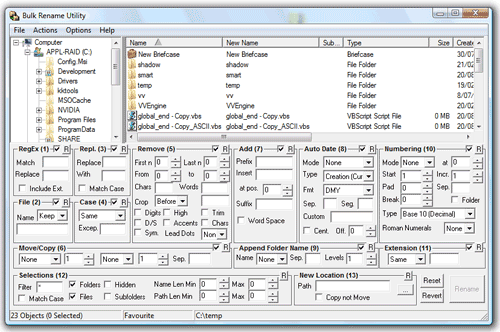
Bulk Rename Utility is a free file renaming software for Windows. Bulk Rename Utilityallows you to easily rename files and entire folders based upon extremely flexible criteria.
Add date/time stamps, replace numbers, insert text, convert case, add auto-numbers, process folders and sub-folders....plus
 Rename multiple files quickly, according to many flexible criteria. Rename files in many ways: add, replace, insert text into file names. Convert case, add numbers. Remove or change file extensions. Check the detailed preview before renaming. Rename photos using EXIF meta data (i.e. "Date Picture Taken", "Resolution" and other information embedded in all JPG photo files) Rename your holiday pictures from a meaningless dsc1790.jpg to NewYork1.jpg in a flash. Rename MP3 files using ID3 tags (a.k.a. MP3 ID3 tag renaming). Change files' creation and modification time stamps.
Bulk Rename Utility is an easy to use file rename program Renaming multiple files has never been easier! It has a small memory footprint so it can be left running all the time without consuming all your memory. It started as a freeware Visual Basic tool, but as its popularity has grown it has been completely rewritten in C++ to be robust and lightweight - and very, very fast! It can easily handle folders/discs containing well over 100,000 entries... and it can batch rename1,000s of files in seconds.

No comments:
Post a Comment